


Harbor Color - Your Cozy Home
4.776.00 Reviews
App Specs
- Version
- 1.0.2
- Updated On
- License
- Free
- Downloads
- 100,000+
- Developer
- Sunny Lamb Studio
- Categories
- Board
- Platform
- Android
Screenshots
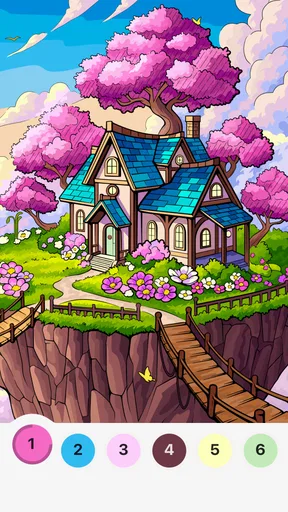

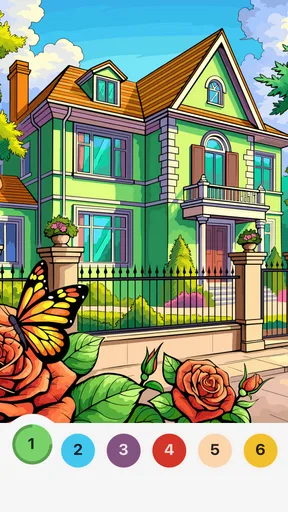
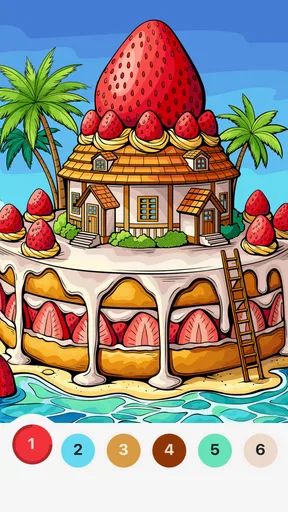
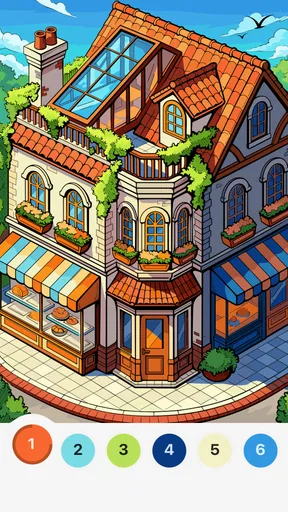
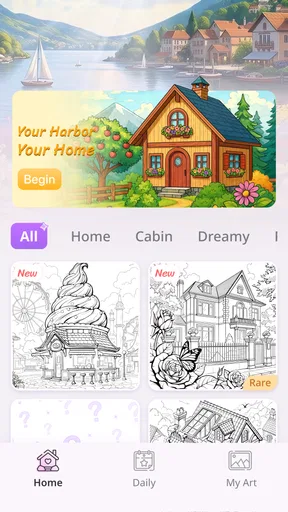

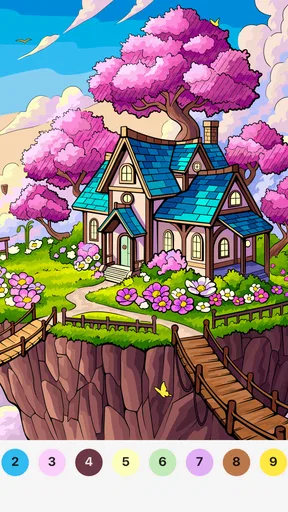
 Analysis by AppCompare
I approach Harbor Color as a quiet, hands-on board game rather than a tool for planning an actual room. Its appeal is the small pleasure of working through a home-themed coloring scene: choose a moment, settle into its details, and let the activity occupy a spare stretch of time. That makes Harbor Color - Your Cozy Home a better fit for a relaxed break than for anyone expecting a full interior-design simulator or a competitive puzzle challenge.
A low-pressure way to begin
My best first-session routine is simple: open a scene, take a moment to look over its larger areas, then color at a pace that feels comfortable. I try not to treat every detail as a task to finish as quickly as possible. The home setting gives the activity a gentle, familiar tone, and a slower approach helps preserve that mood instead of turning coloring into another item on a to-do list.
That makes the game easy to imagine using while waiting for dinner, during a quiet commute break, or at the end of the day when I want something more engaging than scrolling but less demanding than a strategy game. It is also a reasonable option for a short shared moment with a child, though I would still check that the particular scene and controls suit them rather than assuming every coloring activity will hold their attention.
Settings and expectations to check
Before settling in, I would check the device’s screen brightness and sound level. Those are ordinary adjustments, not special game features, but they can make a noticeable difference when the goal is a calm session. A bright display can make a relaxing activity feel tiring in a dim room, while unexpected sound can be unwelcome if you are playing near someone who is resting.
The game is free, and its content rating is Everyone, which makes it approachable for a broad audience. Still, “free” is not a promise about every detail of the playing experience, so I would review the current store page and the device’s purchase controls if a child will be using it. The practical point is to set expectations before handing over a phone, rather than interrupting a peaceful session to sort out account settings.
Small habits that make coloring easier
A useful habit is to decide what you want from each visit before opening the game: a quick few minutes, a longer unwind, or a chance to focus on one scene. That keeps a short break from stretching unexpectedly and gives the activity a natural stopping point. If you prefer finishing what you start, choose a moment when you are not likely to need the device immediately; if you simply want a pause, there is no need to make completion the goal.
I also find it helpful to treat the screen as a little composition rather than a checklist. Look at how the room’s larger shapes relate, then work toward the small touches that catch your eye. This is a personal workflow, not a claim about a hidden mode or shortcut, but it gives the coloring a more satisfying rhythm and helps avoid the feeling of tapping randomly just to get through a picture.
Worth Reading Before You Choose

EA SPORTS FC Mobile 26 Is a Bigger Football Game, but It Takes Time

Flipboard Shows What News Apps Must Do Beyond the Feed

Switching to Android Auto Means Rethinking Your Driving Routine

Google Calendar Makes a Crowded Week Easier to Manage

Ludo King Makes the Most of the Minutes Between Plans

Baby Panda World Brings Quick Play to Modern Phones, but Its Game Library Feels Busy
Where it sits among board games
Compared with a traditional board game, Harbor Color is a solitary, screen-based activity without the shared turns and face-to-face decisions that make tabletop play social. Compared with a competitive mobile puzzle, its attraction is less about racing a timer or beating another player and more about taking a quiet moment with a designed scene. That distinction is useful when choosing: I would reach for this when I want low pressure, and choose a multiplayer board game when company and conversation are the point.
It is also different from a general coloring app in its home-centered presentation. If rooms and cozy interiors are what draw you in, that theme gives the activity a clearer identity than a collection of unrelated pictures might. If you would rather color animals, abstract patterns, or a wider variety of subjects, a broader coloring app may be a better match. The theme is a strength when it suits your taste and a limitation when it does not.
Who is likely to enjoy it
I would recommend it to people who like coloring but do not want a complicated creative tool, and to anyone looking for a gentle game that can fit around everyday routines. It may also appeal to players who enjoy home décor imagery without needing the detailed controls of a room-planning app. The distinction matters: this is entertainment built around coloring scenes, not a reliable way to preview paint or furniture in your own home.
I would skip it if you need a deep strategy game, a social board-game experience, or precise design software for a real renovation. It is not the right substitute for measuring a room, comparing actual paint samples, or making purchases with confidence. For those tasks, a dedicated planning tool and physical samples are more useful. Harbor Color is at its best when the goal is a pleasant few minutes, not a decision about what to install at home.
First Impressions
When I first opened Harbor Color - Your Cozy Home, I was immediately struck by its sleek and inviting interface. The design is intuitive, making it easy for even the least tech-savvy among us to navigate. The home screen greets you with an array of vibrant colors and themes, each promising to add a unique touch to your home. It’s like Pinterest, but specifically designed for your living space.
Features That Stand Out
The app is loaded with features that cater to both amateur decorators and seasoned pros. One of my favorite features is the virtual room designer. It allows you to upload a photo of your space and experiment with different color palettes and décor styles. Trust me, seeing your room transform with just a few taps is downright magical. It’s like having a personal interior designer right at your fingertips.
Another cool feature is the color matching tool. If you’ve ever fallen in love with a color but couldn’t quite nail it down, this tool is for you. Simply snap a photo of anything that catches your eye, and the app will match it to the closest paint color. Say goodbye to endless trips to the hardware store!
User Experience
Using the app is a breeze. The developers have clearly put a lot of thought into making the user experience as seamless as possible. The tutorials are helpful without being overwhelming, and the app’s community forum is a great place to swap ideas and get inspiration from fellow users.
One thing I particularly appreciated is the ability to save and share your projects. Whether you’re seeking input from friends or just want to keep track of your progress, this feature is incredibly useful.
Design Inspiration
If you’re ever stuck for ideas, the app’s inspiration section is a treasure trove of creativity. It’s packed with trending designs, seasonal themes, and expert tips that can help spark your imagination. From minimalist chic to bohemian paradise, there’s something for everyone.
What’s more, the app regularly updates its content, ensuring that you’re always in the loop with the latest design trends. It’s like having a subscription to every interior design magazine out there, all rolled into one convenient app.
Room for Improvement
While I’m smitten with the app, it’s not without its minor quirks. Occasionally, the app can be a bit slow to load, especially when working with high-resolution images. However, this is a small price to pay for the wealth of features it offers.
I also found myself wishing for more integration options with social media. Sharing designs directly to platforms like Instagram or Pinterest would be a fantastic addition. Here’s hoping this feature makes it into a future update!
Final Thoughts
Overall, Harbor Color - Your Cozy Home is a delightful tool for anyone looking to revamp their living space. Whether you’re a seasoned decorator or just starting out, the app provides a wealth of resources and inspiration to help turn your home into a cozy sanctuary.
It’s fun, easy to use, and offers a level of personalization that makes decorating feel less like a chore and more like an adventure. So, if you’re looking to inject a bit of personality into your home, give this app a try. You might just find yourself addicted to the world of interior design.
A closer look at what the game is
There is an important distinction to make before downloading: Harbor Color is a board-category game by Sunny Lamb Studio, and its central promise is a soothing coloring experience built around home scenes. That is quite different from the room makeover and color-matching functions described in the earlier sections. I would judge it as a casual game for unwinding, not as a practical decorating assistant. If your aim is to choose a wall color for a real room, a dedicated design app will serve you better.
Its current release is version 1.0.2, and it supports Android 6.0 or later. It has a 4.8 average from around 520 ratings, with over 10,000 installs and 31 written reviews. Those figures suggest that it has found an audience, but they are not a substitute for deciding whether its particular pace and home-focused art appeal to you. It is free to try, which makes a short first session a sensible way to see whether the experience clicks.
Make a session fit the moment
For a realistic everyday use, imagine having ten quiet minutes before bed. I would lower the screen brightness, silence or reduce device audio if needed, and open the game with the intention of relaxing rather than completing a fixed amount. If the scene is absorbing, continue; if the moment ends, put the phone down without feeling that a leisure activity has become homework. This small boundary is especially useful for people who tend to lose track of time in mobile games.
For a longer break, it can help to keep the device steady and use a comfortable grip instead of coloring while walking or juggling other tasks. That is not a special control trick; it is simply a way to make a touch-based activity feel less fussy. If you find yourself rushing through details, pause and return to a larger area of the picture. The visual change of pace can make the session feel restorative again.
What the available numbers can and cannot tell you
The 4.8 average is encouraging, and the game’s Everyone rating makes its broad intended audience clear. I would still treat ratings as a starting point rather than a guarantee that the game will suit every player. People who want quick visual calm may value the same qualities that leave a puzzle fan wanting more challenge. The most useful test is whether you enjoy coloring home scenes for their own sake.
Because the game is free, it is easy to approach as a low-commitment trial. I would nevertheless use the normal care I use with any game on a shared device: check the store page for the current version, keep purchase controls appropriate for the person using it, and make sure the device meets the minimum operating-system requirement. These steps answer the practical questions that matter before installing without assuming anything about the game’s internal settings.
Limits that matter when choosing
Harbor Color’s narrow theme gives it coherence, but it also means its appeal depends on liking cozy domestic imagery. Players who want varied subjects or a substantial collection of puzzle mechanics may tire of that focus. Likewise, it is not a replacement for a social tabletop night: there is no reason to choose a solo coloring game when what you really want is shared turns, banter, and a little friendly competition.
My recommendation is deliberately specific. Choose it when you want a free, gentle coloring game for brief moments of downtime and the home-scene theme sounds pleasant. Choose a conventional board-game app for tactical decisions or multiplayer interaction, and a broader coloring title if variety matters more than a consistent setting. That trade-off is not a flaw so much as the clearest way to understand what this game is designed to offer.
Settling into a repeatable routine
Experienced players do not need secret shortcuts to make a casual game feel better; a repeatable habit is often enough. I would keep a preferred quiet time for playing, adjust brightness and audio before starting, and decide whether the session is meant to be a brief pause or a longer wind-down. With those choices made up front, there is less fiddling once the game is open and more attention left for the coloring itself.
For families, I would make the first session a shared trial: let the child explore a scene while an adult stays nearby, then see whether the calm pace holds their interest. For an adult playing alone, I would avoid stacking it beside chores or messages that demand immediate attention. The game works best as a small pocket of focus, not as background entertainment that has to compete with everything else.
My considered verdict
With a January 28, 2026 release and an Everyone content rating, Harbor Color is a recent, approachable option for players who want home-themed coloring without a steep learning curve. Its strongest case is simple: it offers a relaxed activity that can slot into an ordinary day, and the free price lowers the barrier to trying it. Its limits are just as clear: the theme is specific, the experience is solitary, and it should not be confused with software for planning or renovating a real home.
I would recommend giving it a try if you like calm visual activities and want something gentler than a timed puzzle. I would pass if you need deep mechanics, a broad range of coloring subjects, or direct help making design decisions at home. That is the fairest way I can put it: the game is worth a look for the right mood and player, but its quiet, focused appeal is also exactly what will make it the wrong choice for someone seeking variety or challenge.
Pros
- Intuitive interface for easy navigation.
- Wide range of color options available.
- Includes mood-setting features.
- Customizable layouts for personalization.
- Offline access for convenience.
Cons
- Limited free features; in-app purchases needed.
- Occasional lag on older devices.
- Ads can be intrusive at times.
- No support for multi-language yet.
- Lacks integration with smart home devices.
FAQs for Harbor Color - Your Cozy Home
What is Harbor Color - Your Cozy Home about?
Harbor Color - Your Cozy Home is an interior design app that allows users to visualize and customize their living spaces. It provides a wide range of color palettes and design templates to help users create a cozy and personalized home environment. The app caters to both amateur decorators and professional designers.
How user-friendly is Harbor Color for beginners?
Harbor Color is designed with user-friendliness in mind, making it accessible even for beginners. The intuitive interface guides users through the process of choosing color schemes and design layouts. Tutorials and tips are available within the app, ensuring that new users can easily navigate and utilize its features without any prior experience.
What features does Harbor Color offer to enhance the design experience?
Harbor Color offers features such as a comprehensive color palette library, design templates, and a virtual room preview tool. Users can experiment with different styles and color combinations, adjusting elements in real-time. Additionally, the app includes a community feature where users can share their designs and gain inspiration from others.
Are there any in-app purchases or subscriptions required?
While Harbor Color offers a free version with basic features, there are in-app purchases available for premium content and advanced design tools. Users can opt for a subscription to access exclusive palettes, templates, and ad-free browsing. The app provides transparency about these options, allowing users to decide what suits their needs best.
Is Harbor Color compatible with all Android and iOS devices?
Harbor Color is compatible with most modern Android and iOS devices. However, it is recommended to check the app's requirements on the respective app store to ensure compatibility with your device. Regular updates are provided to support the latest operating systems, ensuring a smooth user experience across platforms.


